How To Clean Contact Points On Apple Vision Pro Audio Straps?
Your Apple Vision Pro is a premium device, and keeping it clean is part of owning it well. Over time, the audio strap contact points collect sweat, oils, and dust. This buildup can affect both hygiene and performance.
Dirty contact points can lead to poor connectivity and skin irritation. That makes regular cleaning more important than most users realize.
The good news is that cleaning the audio straps is simple once you know the right steps. You do not need special equipment or harsh chemicals. A soft, lint-free cloth and a little water can do most of the work.
However, doing it the wrong way can cause real damage. Using the wrong tools or getting moisture in the wrong places can fray materials or harm internal components.
This guide walks you through everything you need to know. You will learn how to safely detach the straps, clean the contact points properly, and avoid the most common mistakes people make.
In a Nutshell
Detach the audio straps first before you start cleaning. This gives you better access to the contact points and makes the process much easier.
Always use a soft, lint-free cloth. Avoid paper towels or rough fabrics that can scratch the surface or fray the material.
Lightly dampen the cloth with fresh water if a dry wipe is not enough. The cloth should be damp, never soaked.
You can use hypoallergenic soap mixed with water for a deeper clean. This is safe and gentle on the strap material.
Never let moisture touch the microphone or speaker meshes. Getting these areas wet can cause serious damage to your device.
Avoid alcohol wipes and non-approved tools at all costs. Alcohol causes fraying, and using the wrong removal tool can damage the strap connectors.
What Are the Contact Points on Apple Vision Pro Audio Straps?
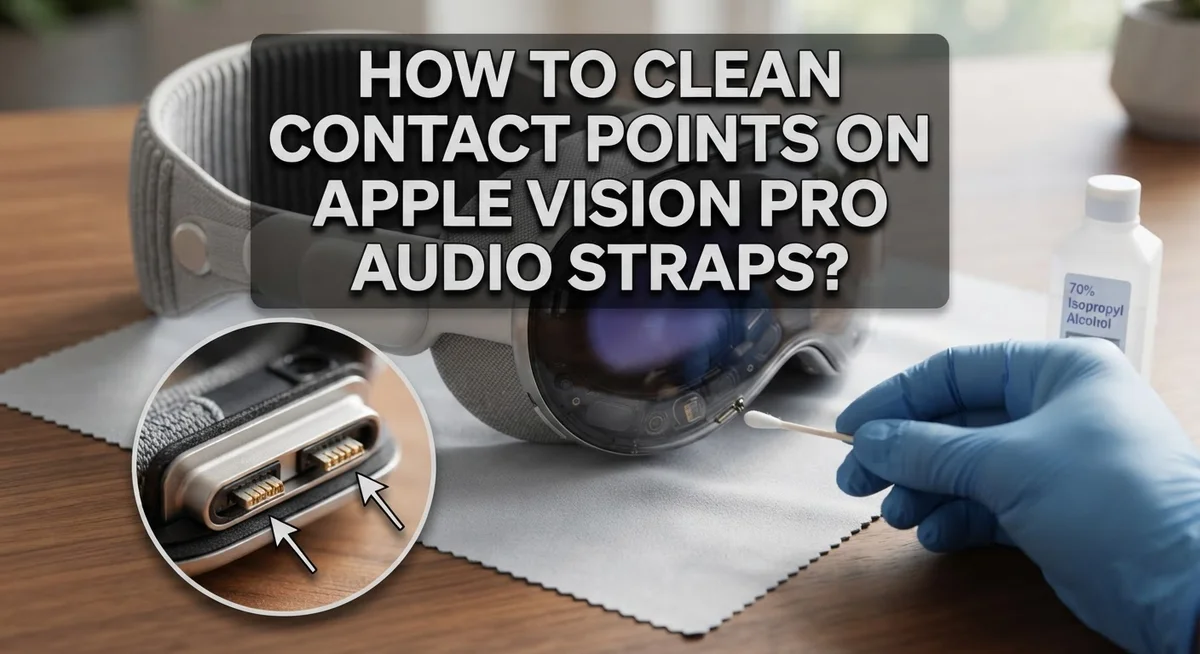
The contact points on your Apple Vision Pro audio straps are small metal or conductive areas. These spots connect the straps to your device and allow audio to flow through properly. Think of them like tiny bridges that transfer sound signals from the headset to your ears.
You’ll find contact points where the audio strap attaches to the main device body. They sit at the connection junction and may look like small metallic dots or surfaces. These areas experience constant contact with your skin, hair, and the environment around you. Over time, dust, oils, and debris build up on these spots.
The contact points serve a specific function. They complete an electrical circuit that powers your audio experience. When they get dirty, the connection weakens. You might notice crackling sounds, one side not working, or audio cutting out unexpectedly. Clean contact points mean better sound quality and consistent performance.
Your audio straps are detachable by design. Apple made them removable so you can access the contact points easily for cleaning and maintenance. This thoughtful design lets you reach these sensitive areas without forcing moisture into the main device body.
The contact points are different from the microphone and speaker meshes. The meshes are porous and can trap water inside if they get wet. The contact points, however, are smooth metal surfaces that you can safely wipe clean. Understanding this difference helps you clean effectively without causing damage.
Regular inspection of these contact points matters too. Look for visible dirt, discoloration, or oxidation. Early detection means you can clean before sound quality drops. This simple awareness keeps your device functioning smoothly and extends the lifespan of your audio straps.
Why Keeping Audio Strap Contact Points Clean Matters
Clean contact points directly affect how well your audio straps work. When dirt, dust, or skin oils build up on these metal connectors, they create a barrier between the strap and your device. This barrier stops electrical signals from flowing properly.
Poor connectivity leads to sound issues. You might notice audio cutting out, becoming muffled, or dropping entirely. Sometimes only one ear receives sound while the other stays silent. These problems happen because dirty contact points can’t transmit the signal your device sends.
Beyond sound quality, clean contact points matter for your skin health too. Bacteria and debris collect on these metal surfaces just like they do anywhere else. When the strap sits against your head during use, these particles transfer to your skin. This can cause irritation, redness, or breakouts over time, especially if you wear your device regularly.
Maintenance is much easier than repair. A quick cleaning every week or two takes just a few minutes. Ignoring this simple task might force you to deal with expensive service calls later. Your device stays in better condition when you keep the contact points clean from the start.
The good news is that cleaning prevents both functional and hygiene problems at once. You don’t need special equipment or expensive solutions. A soft cloth and a little water do the job effectively.
Think of contact point cleaning like brushing your teeth. Small, consistent effort prevents big problems down the road. Your Apple Vision Pro performs better and lasts longer when you give it this basic care. This is why understanding the importance of clean contact points matters before you even pick up a cloth.
Tools and Materials You Need Before You Start
Before you start cleaning the contact points on your Apple Vision Pro audio straps, gather the right tools and materials. Having everything ready makes the process faster and safer.
Soft, lint-free cloth is your main tool. This type of cloth prevents fibers from getting stuck on the contact points. Microfiber cloths work well. Avoid paper towels, tissues, or rough fabrics that can scratch or damage the delicate surfaces.
You will need fresh water for light dampening. Keep it in a small container nearby. Tap water works fine for most cleaning jobs. Some people prefer distilled water to avoid mineral deposits, but it’s not required.
Hypoallergenic soap is optional but helpful. If you want a deeper clean, mix a small amount with water. Make sure the soap contains no harsh chemicals or fragrances. Test it on a hidden area first if you’re unsure.
The extraction tool that came with your device is essential. Use only this approved tool to detach the audio straps. Never use paperclips, tweezers, or other objects that could damage the connection points.
A dry, clean workspace is important too. Lay down a soft surface like a cloth or towel. This prevents the straps from rolling away or getting scratched during cleaning.
Have a second dry cloth ready. After dampening the first cloth, you’ll use this to dry the contact points completely. Moisture left behind can cause connection problems.
Keep your hands clean before handling the straps. Oils and dirt from your fingers transfer to the contact points easily. Wash your hands with soap and water, then dry them thoroughly. These simple preparations ensure your cleaning session goes smoothly and protects your device.
How To Safely Detach the Audio Straps From Apple Vision Pro
Detaching your audio straps safely is the first step toward cleaning those contact points properly. The process is simple and takes just a minute or two.
Start by powering off your Apple Vision Pro completely. This protects both the device and the contact points from any electrical issues during removal. Always power down before handling internal components or detachable parts.
Locate the extraction tool that came with your device. This tool is specifically designed for removing the audio straps without causing damage. Using anything else, like paper clips or other objects, can scratch or bend the delicate contact points.
Hold the device steady with one hand. Position the extraction tool into the small slot or opening next to the audio strap attachment point. Gently apply slight pressure and wiggle the tool carefully until the strap begins to release.
Pull the strap away slowly and deliberately. Do not yank or force it suddenly. The contact points are fragile, and rough handling can bend them permanently.
Once detached, set the strap on your clean, dry workspace. Keep the device itself on a stable surface where it won’t roll or fall.
Inspect the contact points on both the strap and the device body before cleaning. Look for visible dirt, dust, or corrosion. These are signs that cleaning is definitely needed.
Handle the straps by their fabric portions only. Avoid touching the contact points with your bare fingers, as skin oils can transfer onto them and cause future connectivity problems.
Keep the extraction tool nearby for reattachment after cleaning. You’ll use the same careful technique to reconnect everything once the contact points are clean and dry.
Step-by-Step Guide To Cleaning the Contact Points
Start by examining the contact points on both your strap and device. Look for any visible dirt, dust, or residue on the metal connectors. These small metal areas are where sound and power transfer happens.
Take your soft, lint-free cloth and gently wipe each contact point. Use light pressure and circular motions. This removes loose debris without damaging the delicate metal surfaces. Spend extra time on any spots that look dull or discolored.
If dry wiping doesn’t remove stubborn buildup, lightly dampen your cloth with fresh water. The key word is lightly dampened, not wet. Squeeze out excess water until your cloth feels barely moist. Wipe the contact points again with this slightly damp cloth.
For deeper cleaning, add a tiny drop of hypoallergenic soap to your water. Mix it well before dampening your cloth. This helps break down oils and residue that water alone might miss. Wipe gently across each contact point.
Never wet the microphone or speaker meshes. These components can be damaged by moisture. Focus only on the metal contact areas.
Once you finish dampening, use your second dry cloth immediately. Dry every contact point completely. Any remaining moisture can cause connection problems or corrosion over time.
Let the strap air dry for a few minutes before reattaching it. This ensures no hidden moisture remains. Check that all contact points look shiny and clean.
Repeat this cleaning process every two weeks for best results. Regular maintenance prevents buildup and keeps your audio quality consistent. Your Apple Vision Pro audio straps will function better and last longer with this simple routine.
How To Clean the Rest of the Audio Strap Safely
After you finish cleaning the contact points, the rest of your audio strap needs attention too. This ensures your entire strap stays hygienic and functions properly over time.
Start by wiping the fabric portion of the strap with your soft, lint-free cloth. Use gentle circular motions along the entire length. This removes dust, skin oils, and any buildup that collects during daily use.
If the fabric looks dirty or smells stale, lightly dampen your cloth with fresh water. Wipe the fabric surfaces carefully. Make sure water doesn’t drip onto the microphone or speaker meshes. These sensitive areas can malfunction if they get wet.
For stubborn stains on the fabric, add one tiny drop of hypoallergenic soap to your water. Mix it gently and apply the solution to the affected area. Wipe again with your damp cloth, then immediately follow up with a dry cloth to remove excess moisture.
Pay special attention to areas where your skin contacts the strap regularly. These spots accumulate sweat and oils faster. A light cleaning here prevents odor and keeps the material fresh.
Check the underside of the strap where it rests against your head. This area often gets overlooked but collects debris easily. Wipe it thoroughly with your damp cloth.
Never soak your audio strap in water. This can damage internal components and the fabric itself. Always use a lightly dampened cloth instead.
After cleaning, let your strap air dry completely for several minutes before reattaching it to your device. This prevents moisture from entering any openings or contact areas. Store your strap in a clean, dry location when not in use.
Common Mistakes To Avoid When Cleaning Audio Strap Contact Points
Cleaning your Apple Vision Pro audio strap contact points requires care. Several common mistakes can damage your device or reduce its performance if you’re not careful.
Using alcohol wipes is a major error. Many people think alcohol cleans better, but it actually causes the fabric to fray and deteriorate. Stick with water and hypoallergenic soap instead. Alcohol also strips protective coatings from the contact points themselves.
Don’t wet the microphone or speaker meshes under any circumstances. These components are sensitive to moisture. Water entering these areas causes sound quality to drop or stops audio from working entirely. When you dampen your cloth, squeeze out excess water first. Your cloth should feel barely damp, not wet.
Never use unapproved tools to remove the straps. Paper clips, tweezers, or other metal objects can scratch the contact points or damage the extraction mechanism. The included extraction tool exists for this exact reason. Using anything else voids your ability to safely reattach the straps.
Avoid touching contact points with bare hands or jewelry. Oils from your skin create buildup on the metal contacts. Rings and bracelets can accidentally scratch these delicate surfaces. Handle straps only by their fabric portions during cleaning.
Don’t rush the drying process. Some people reattach straps while they’re still damp. This traps moisture against the contact points and causes corrosion. Let your strap air dry for several minutes after cleaning.
Finally, never soak your audio strap in water. This damages internal wiring and weakens the fabric structure. A lightly dampened cloth does the job effectively without soaking.
How Often Should You Clean the Audio Strap Contact Points?
Your Apple Vision Pro audio strap contact points need regular cleaning to work properly. The frequency depends on how often you use your device and your environment.
Clean your contact points every two weeks if you wear your Vision Pro daily. This regular schedule prevents buildup from sweat, dust, and oils that accumulate naturally during use. Daily users should stick to this timeframe without exception.
If you use your device less frequently, monthly cleaning works fine. Check the contact points visually before each use. If you see any discoloration, residue, or dull spots on the metal contacts, clean them immediately rather than waiting for your scheduled cleaning day.
Environmental factors matter significantly. If you exercise while wearing your device, increase cleaning frequency to weekly. Sweaty conditions create more buildup on contact points. Similarly, dusty or humid environments require more frequent attention than clean, dry spaces.
Pay attention to your skin’s condition too. People with oily skin or those who perspire heavily should clean contact points weekly. Those with dry skin can extend cleaning to every three weeks.
Watch for performance issues as your cleaning schedule guide. If you notice audio cutting out, reduced sound quality, or connection problems, your contact points likely need cleaning. Don’t wait for your next scheduled cleaning if problems appear.
Store your device properly between uses. Keeping it in a clean, dust-free environment reduces contact point contamination. This extends the time between necessary cleanings.
Start with a two-week cleaning schedule and adjust based on your personal usage patterns and environment. This approach keeps your audio strap functioning optimally while maintaining device hygiene.
Final Thoughts
Keeping your Apple Vision Pro audio strap contact points clean is a simple habit that pays off significantly over time.
Dirty contact points cause real problems. You may notice audio dropouts, connection issues, or reduced sound quality. All of these can often be traced back to buildup on the metal contacts.
The good news is that the cleaning process itself is straightforward. A soft, lint-free cloth and a little water are usually all you need to get the job done properly.
Always detach your straps before cleaning. This gives you better access to every surface, including the contact points. Use only the included extraction tool to remove them safely.
Avoid alcohol wipes, soaking, and unapproved tools at all costs. These mistakes can cause fraying, damage internal components, and void your warranty. Stick to gentle methods every single time.
Hypoallergenic soap mixed with water works well for stubborn buildup. Apply it to your cloth lightly, never directly to the strap or contact points themselves.
Let everything dry completely before reattaching the straps. Rushing this step can cause moisture damage that builds up gradually.
A two-week cleaning schedule works well for daily users. Less frequent users can clean monthly and still maintain great performance.
Think of this routine as device maintenance, not just hygiene. Clean contact points mean consistent audio performance and a longer lifespan for your straps.
Small, consistent efforts protect a significant investment. Your Apple Vision Pro is a premium device, and the audio straps are a key part of that experience.
Stay consistent, stay gentle, and your contact points will stay in excellent condition.
Frequently Asked Questions
Can I use regular soap to clean the contact points?
Yes, you can use soap. Choose hypoallergenic soap mixed with water for the best results. Regular soap works too, but hypoallergenic options are gentler on your skin and the strap materials. Mix a small amount with fresh water to create a light cleaning solution. Avoid scented soaps because they can leave residue on the contact points.
What type of cloth should I use?
Always use a soft, lint-free cloth. Microfiber cloths work great for this task. Regular towels or paper towels leave fibers behind that stick to the wet contact points. These fibers can interfere with electrical connections. Keep a dedicated cloth just for your Vision Pro to prevent contamination from other cleaning jobs.
How wet should the cloth be?
Keep the cloth lightly dampened, not soaked. A damp cloth means water is present but not dripping. Squeeze out excess water before touching any part of the strap. This prevents water from seeping into the microphone or speaker meshes. If you accidentally over-wet the cloth, let it air dry for a few seconds before using it.
Should I detach the straps before cleaning?
Yes, always detach the straps first. This gives you full access to the contact points and all surfaces. Use only the included extraction tool to remove them safely. Detaching makes the cleaning process faster and more thorough. You can clean both sides of the strap without struggling to reach tight areas.
What should I avoid during cleaning?
Never use alcohol wipes or paper clips on your straps. Don’t let water touch the microphone or speaker meshes. Avoid handling contact points with bare hands or jewelry because skin oils create buildup. Skip the soaking method entirely as it damages internal components.

Hi, I’m Suzy — the voice behind RapidGenLab. I’m a tech enthusiast who loves breaking down complex products into simple, honest reviews and comparisons. Got a question? Feel free to reach out!